Views: 0 Author: Site Editor Publish Time: 2026-09-25 Origin: Site
In the fast-paced commercial printing ecosystem, the press room usually steals the spotlight. Yet, the finishing department remains the true gatekeeper of profitability. Choosing the wrong equipment wastes valuable labor hours. Conversely, a severely undersized machine instantly limits your daily production capabilities.
To maximize efficiency and return on investment, print shop owners must critically evaluate foundational factors like cutting width, drive mechanisms, and intelligent control functions. In this comprehensive breakdown, we explore how to navigate these technical specifications effectively to secure long-term operational success.
Size Matters: Your optimal cutting width must accommodate the diagonal measurement of your maximum sheet size. This allows seamless stack rotation during complex finishing jobs without removing heavy paper stacks from the air table.
Power Differences: Hydraulic drive mechanisms offer consistent clamp pressure and cutting force. They demonstrate clear superiority over electric models for high-volume commercial operations.
Automation is Key: Implementing programmable interfaces decreases setup times significantly by utilizing saved cut sequences and servo-driven backgauge positioning.
Safety First: Regulatory compliance requires modern equipment to feature active infrared light curtains and two-hand operation protocols, protecting operators from severe workplace injuries.
The commercial printing sector is currently experiencing a massive shift toward hyper-automation. Recent market analyses indicate that modern print shops face unprecedented skilled labor shortages. To combat this, facility managers are increasingly demanding smart finishing equipment that integrates directly with central management information systems.
Cutting machines are no longer isolated islands of production. Advanced units now receive job definition format data directly from the prepress department. This seamless data transfer transitions the finishing department from a manual bottleneck into a streamlined, data-driven workflow, drastically reducing setup times and material waste.
The finishing department serves as the final critical stage before a product reaches the client. Upgrading your equipment transcends mere convenience. It represents a strategic capital investment that directly dictates operational margins, workforce allocation, and ultimate product quality.
Relying on outdated machinery introduces severe bottlenecks into your production workflow. Picture an operator meticulously measuring, testing, and adjusting the backgauge for every single cut sequence. Those micro-delays compound exponentially over a single shift. By automating repetitive tasks, print shops can reallocate skilled labor to more profitable activities like press operation or quality control.
Material waste acts as a direct drain on profitability. An inaccurate or aging paper trimming machine often suffers from blade drift or inconsistent clamping pressure. This leads to uneven cuts or dimensionally flawed finished products. When a stack of freshly printed stock is ruined at the cutting stage, the shop loses the paper cost, expensive ink, press time, and labor. Precision equipment ensures dimensional accuracy down to the millimeter, virtually eliminating finishing-related spoilage.
Capacity planning requires looking far beyond current job tickets. Investing in robust commercial-grade equipment enables a facility to confidently accept larger, more complex orders. Whether a client requests thick perfect-bound catalogs or heavy cardstock packaging, having the appropriate cutting power ensures your shop can fulfill the contract in-house.
Selecting the correct cutting width is the most fundamental decision when specifying a new machine. Purchasing a unit that is too small bottlenecks your press output, while buying an excessively large machine wastes valuable floor space and capital.
A common operational error involves matching the cutter width exactly to the maximum sheet size. In practical application, operators must frequently rotate paper stacks inside the machine throat to complete four-sided trims. Therefore, the cutting width must accommodate the diagonal length of your largest sheet.
You can calculate this using basic geometry. If your standard maximum sheet size is 20 by 26 inches, the diagonal measurement is approximately 32.8 inches. To easily maneuver this heavy stack without dragging it off the air table, you require a cutting width of at least 33 inches. Industrial models frequently offer widths of 1150mm or 1370mm to comfortably handle standard B1 offset sheets without workflow interruption.
The mechanism driving the blade and clamp determines machine durability, cutting capacity, and suitability for various substrates. The primary engineering choices in commercial environments are electric and hydraulic systems.
| Feature | Electric Drive Systems | Hydraulic Drive Systems |
|---|---|---|
| Power Source | Dedicated motors and gearboxes | Pressurized fluid and heavy-duty cylinders |
| Best Substrates | Standard text weight, light cardstock | Dense chipboard, plastics, thick book blocks |
| Maintenance Needs | Lower maintenance, no fluid changes | Requires periodic hydraulic fluid replacement |
| Operation Volume | Intermittent or single-shift digital shops | Continuous multi-shift commercial operations |
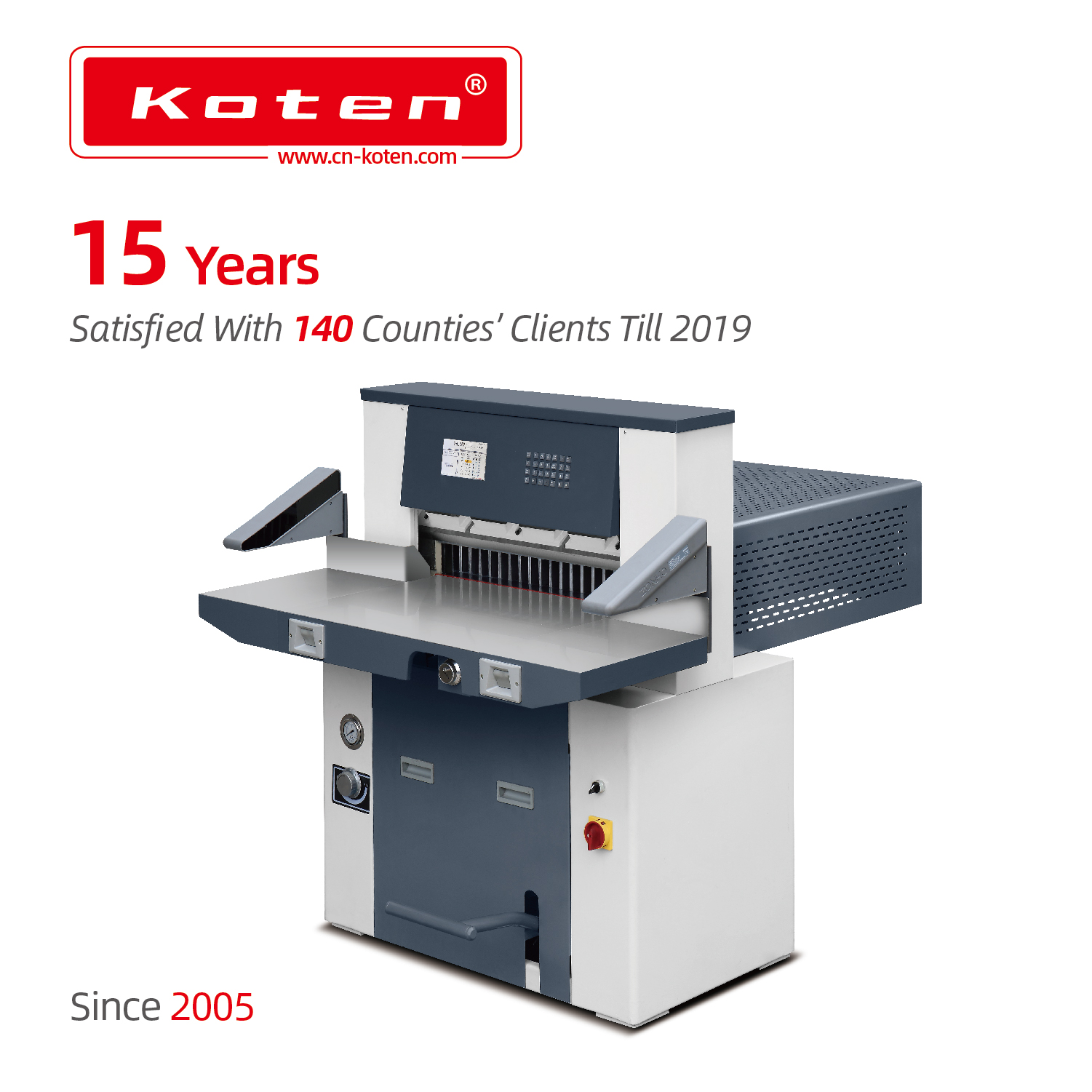
For high-volume commercial printing and bindery operations, fluid dynamics represent the undisputed industry standard. A commercial hydraulic paper cutter provides immense, consistent, and easily adjustable power. Instead of mechanical gears, these machines use pressurized hydraulic fluid to drive both the knife and the clamping bar. This approach ensures uniform downward force across the entire width of the paper stack.
Hydraulic drive mechanisms are vastly superior when processing tough materials. When forcing a blade through thick stacks of heavy cover stock or laminated sheets, electric motors can bog down or cause the blade to chatter. Hydraulic machines slice through stubborn materials smoothly, maintaining a constant downward velocity and suffering far less mechanical wear under heavy continuous loads.
In the modern print finishing environment, raw mechanical power must pair with digital intelligence. Relying on manual measurements is no longer viable for competitive facilities looking to scale.
Modern full-color touchscreen interfaces function similarly to industrial tablets. They offer intuitive, visual representations of the paper stack and required cut sequences. Operators can visually confirm the layout of a 12-up business card sheet before the blade ever drops, drastically reducing cognitive load and preventing catastrophic errors.
One of the most significant return on investment drivers is job memory. Upgrading to a programmable paper cutter allows the operator to perform complex setups once, save the exact sequence as a recipe, and recall it instantly. High-end models feature memory capacities exceeding 100 individual cutting programs. By eliminating manual dimension calculations for repeat jobs, a shop can reduce setup times by up to fifty percent.
The backgauge acts as the heavy metal fence pushing the paper stack forward to the exact cutting dimension. Programmable systems utilize precision servo motors. Once a cut program initiates, the computer commands the motor to move the backgauge accurate to within 0.01mm. This automated positioning eliminates human measuring errors entirely.
A razor-sharp blade proves useless if the paper stack shifts during the cutting cycle. Achieving a perfectly square cut requires absolute control over how the material is secured before the blade makes contact.
Different paper stocks react differently to physical pressure. Applying maximum clamp pressure to delicate carbonless forms will burst the microscopic ink capsules instantly. Conversely, applying insufficient pressure to glossy coated cover stock causes the middle sheets to slide forward, creating a defect known as draw. Industrial machines allow operators to micro-adjust the clamp pressure to match specific substrate integrity.
When the heavy metal clamp descends, it can leave permanent indentations on top sheets. Manufacturers utilize false clamp plates to distribute the clamping force over a much larger surface area, protecting delicate printed materials. Furthermore, standard commercial cutters feature optical cutting lines. An LED beam casts a distinct shadow exactly where the blade will strike, allowing operators to align printed registration marks directly with the cut line.
Industrial cutting equipment relies on immense force and razor-sharp steel. Consequently, operator safety must remain the primary consideration during procurement and daily operation.
The most critical safety feature on a modern commercial paper guillotine is the active infrared light curtain. This system emits an invisible grid of beams across the cutting tunnel opening. If an operator's hand breaks this plane while the blade is in motion, safety relays engage instantly, halting the descent in milliseconds.
To further guarantee safety, commercial machines utilize strict two-hand operation systems. The operator must press and hold two separate buttons simultaneously to initiate a cut. If one button is released, the blade stops immediately. Additionally, when the blade returns to its highest position, a heavy-duty mechanical steel pin engages. This interlock ensures the heavy knife assembly cannot accidentally drop under its own weight during a power outage.
Selecting the right equipment requires looking beyond the specification sheet. You must evaluate how the machine integrates into your physical facility and long-term business strategy.
Commercial cutting machines are incredibly heavy, constructed from massive cast-iron frames designed to absorb vibration. A mid-sized printing shop cutter can easily weigh between 1,500 and 3,000 pounds. Verify your facility's structural integrity and measure all access points, including loading dock doors and freight elevators, before scheduling delivery.
Industrial machinery requires specific power configurations. Consult with a licensed electrician to verify whether the machine needs single-phase or three-phase power, and check specific voltage requirements. Furthermore, investigate the manufacturer's reputation for after-sales support. Access to comprehensive technical manuals, spare parts, and local blade sharpening services ensures your equipment remains operational for decades.
Choosing the right equipment directly dictates your shop's daily output and overall profitability. Cutting width and advanced control features determine production speed, while robust hydraulic systems provide reliable power for diverse substrates. By embracing programmable interfaces, print shops eliminate manual measuring errors, reduce expensive paper waste, and alleviate operator fatigue. Carefully evaluate your specific facility needs and workflow bottlenecks before making a purchase. Investing smartly in the right finishing technology secures your department's long-term success.
Ready to upgrade your finishing department? Explore high-performance, precision-engineered cutting solutions tailored for commercial print shops at Koten Machinery to find the perfect match for your production needs.
A standard paper trimmer utilizes a rotary wheel or a manual bypass blade designed for light-duty tasks, such as cutting a few sheets of copy paper. They lack structural rigidity. In contrast, a commercial guillotine is a heavy-duty industrial machine engineered to slice through massive reams of paper in a single, automated stroke. They utilize heavy cast-iron frames, motorized clamps, and precision-ground blades to ensure hundreds of sheets are cut perfectly square simultaneously.
The sharpening schedule depends entirely on your production volume and the substrates processed. A shop cutting standard uncoated bond paper intermittently might only change the blade every three to six months. However, high-volume operations cutting dense cardstocks or recycled papers with high ash content may dull a high-speed steel blade in a matter of weeks. If the cutting motor sounds strained or the cut edges feel rough, swap the blade immediately.
Yes, the financial return on investment is highly quantifiable. In a manual workflow, an operator might spend ten minutes meticulously adjusting the backgauge for a complex multi-cut job. With a programmable system, that setup time is reduced to seconds by recalling a saved digital recipe. Over a year, this translates to hundreds of hours of reclaimed labor. Automated positioning also drastically reduces human error and expensive paper waste.
The choice depends on your specific workload. Fully electric machines use motors and gears, making them affordable and adequate for digital print shops cutting standard weight papers in moderate volumes. However, if your facility operates continuously, routinely cuts stacks thicker than three inches, or processes highly dense materials like chipboard, a hydraulic cutter is strongly recommended. Fluid dynamics provide smooth, adjustable power that will not stall under heavy loads.
Commercial cutting machines typically feature a maximum cutting height ranging from 3 to 6.5 inches per cycle, depending on the model's overall size and drive mechanism. Heavy-duty hydraulic models generally accommodate taller stacks without compromising cut accuracy or straining the motor, allowing operators to process larger reams of paper in a single pass.
Unlike standard office equipment, industrial cutters rarely plug into standard wall outlets. Most commercial-grade machines require dedicated three-phase electrical power, typically running at 220V, 208V, or 480V depending on regional standards. Facility managers must consult with licensed electricians prior to installation to ensure the building can supply the correct voltage and amperage without overloading internal circuits.


